
HN
@heloix_news
Tech
Comment
420
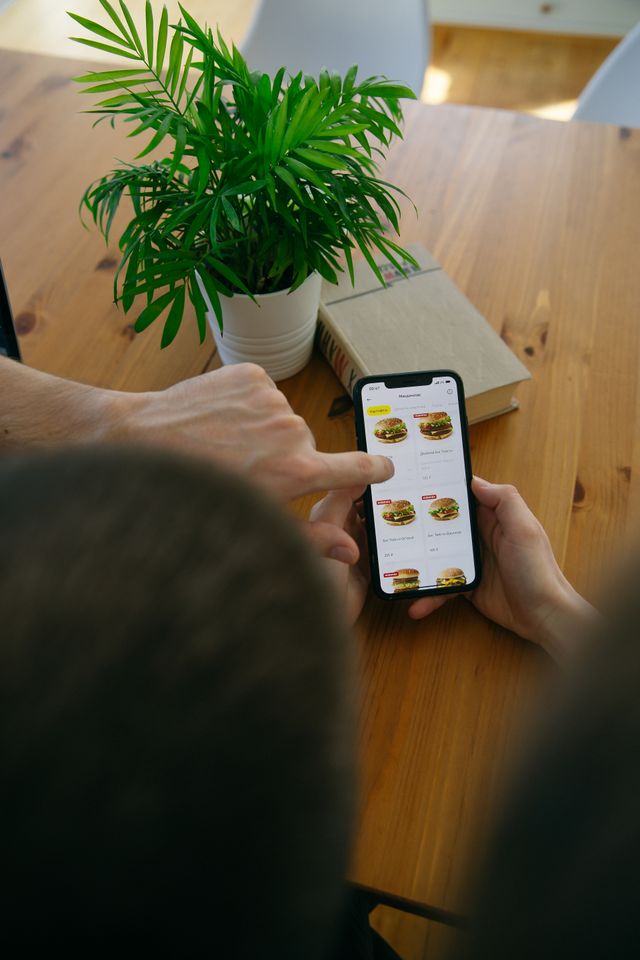
Starting a restaurant business is no longer only about having a good menu and a suitable location. Customers now expect convenient ways to browse food, place orders, make payments, and receive updates without having to wait for a staff member.
This is where a restaurant ordering system can make a difference.
A restaurant ordering system allows customers to view a digital menu, select items, place orders, and pay online. Depending on the type of system, restaurants can also manage incoming orders, update menus, track payments, and organize delivery or pickup orders from one place.
If you are considering building or launching one in 2026, this guide explains the main things you need to understand before getting started.
Software that aids restaurants in digitally accepting and managing customer orders is known as an ordering system.
Instead of relying completely on phone calls, paper menus, or orders taken manually at the counter, customers can use a website, mobile app, QR code, or other digital interface to place their orders.
A typical system can include:
Digital food menus
Customer registration and login
Food categories and item descriptions
Cart and checkout
Online payments
Order tracking
Pickup and delivery options
Restaurant order management
Customer notifications
Discounts and coupon management
Order history
Basic sales reports
The exact features depend on the restaurant's requirements. A small café may need a simple online ordering system, while a restaurant chain may require multiple locations, staff accounts, inventory integration, and detailed reporting.
Customers have become comfortable ordering products and services through their phones. Food is no different.
A digital ordering system gives customers another way to interact with a restaurant. Someone can check the menu before visiting, order food for pickup during a busy workday, or place a delivery order from home.
For restaurants, digital ordering can also reduce some of the manual work involved in taking orders.
For example, when a customer places an order through the system, the restaurant can receive the details digitally instead of having an employee write down every item.
The system can also help organize orders and reduce confusion during busy periods.
However, the software itself does not guarantee a successful restaurant business. Food quality, pricing, customer service, delivery, location, and reputation still matter.
If you are new to this type of business, avoid trying to build every possible feature from the beginning.
Start with the basic customer journey.
A customer should be able to:
Open the restaurant's ordering platform.
Browse the menu.
Select food items.
Add items to a cart.
Enter delivery or pickup details.
Choose a payment method.
Place the order.
Receive confirmation.
On the restaurant side, staff should be able to see new orders and update their status.
This basic structure gives you a foundation that can be expanded later.
You can add advanced features after you understand how customers and restaurant owners use the platform.
One of the most crucial parts of the system is the menu.
Each food item can include a name, description, price, image, category, and availability status. Restaurants should also be able to update prices and remove unavailable items without depending on a developer.
Customers should be able to review their selections before placing an order.
The checkout page should clearly display food prices, taxes, delivery charges, discounts, and the final amount.
Customers may give up on their orders if the checkout process is difficult.
A restaurant ordering platform can support online payment methods such as cards, digital wallets, bank-based payments, or other payment options available in the target market.
Payment integration should be handled carefully because customers expect transactions to be secure and reliable.
A straightforward method for handling incoming orders is necessary for restaurant employees.
An order dashboard can show new, confirmed, preparing, ready, completed, and cancelled orders.
The exact statuses can vary depending on whether the restaurant handles delivery, takeaway, or table orders.
Not every restaurant needs its own delivery fleet.
Some businesses may focus on pickup, while others may work with delivery partners. Your system should match the restaurant's operating model rather than forcing every business to use the same setup.
After placing an order, customers want to know what happens.
Notifications can confirm the order and provide updates as it moves through the process.
Launching the platform involves more than installing software.
First, decide who the system is for. You might target independent restaurants, cafés, cloud kitchens, food trucks, or restaurant chains.
Next, decide whether you are creating the platform for one restaurant or planning to offer it to multiple restaurant owners.
This decision can affect the entire product structure.
A system for a single restaurant, for instance, might just need one restaurant account. A platform intended for multiple businesses may need separate dashboards, restaurant profiles, subscription management, and different levels of access.
You should also decide whether customers will order through a website, mobile application, QR code, or a combination of these options.
Once the core requirements are clear, you can prepare the product, configure the menu and payment features, test the ordering process, and launch it with a small group of users.
Building a restaurant ordering platform from scratch gives you complete control over the software.
You can decide how the system looks, how it works, and which features it includes. However, custom development also requires planning, programming, testing, security work, maintenance, and ongoing updates.
For a new business, this can take considerable time and resources.
A ready-made product provides another approach. Instead of developing every component from zero, you can start with an existing software product and customize it for your business model.
Platforms such as heloix.com can be useful here because ready-made and source-code-based products can give businesses a starting point for launching their own software offering without developing the entire system from scratch.
The right option depends on your budget, technical resources, customization requirements, and long-term plans.
Before you launch a restaurant ordering system, test the complete customer journey.
Place test orders from different devices and check whether the menu displays correctly.
Test the cart, checkout, payment process, order confirmation, and notifications.
On the restaurant side, make sure staff can receive and manage orders without confusion.
You should also test what happens when an item is unavailable, a payment fails, an order is cancelled, or a customer enters incorrect information.
These situations may seem small during development, but they can create serious problems once real customers start using the platform.
A new software business does not always need to begin with dozens of features.
A smaller version can be easier to test and improve.
For example, your first version could focus on:
Restaurant registration
Digital menus
Customer ordering
Cart and checkout
Online payments
Restaurant dashboard
Order status updates
Once restaurants begin using the system, you can identify which additional features are actually useful.
Later, you could consider loyalty programs, advanced analytics, multiple restaurant locations, promotional tools, delivery integrations, table ordering, QR-based ordering, and other features.
This approach can help you avoid spending time developing features that customers may not use.
If you plan to offer the software to multiple restaurants, you also need a business model.
One option is a monthly or yearly subscription. Restaurants pay a recurring fee to use the platform.
Another option is charging a setup fee along with a subscription.
You could also offer different plans based on features. A basic plan might provide online ordering and menu management, while higher plans could include advanced reports, multiple locations, marketing tools, or additional integrations.
Transaction-based pricing is another possibility, although the costs and payment structure need to be clearly explained to restaurant owners.
A restaurant ordering system can provide a digital way for restaurants to manage menus, receive orders, process payments, and communicate with customers.
For beginners, the most practical approach is to start with the basic ordering process instead of trying to create a massive platform immediately.
Define your target users, choose the core features, decide how customers will place orders, test the complete system, and then expand based on real usage.
If you want to launch a restaurant ordering system as a software business, a ready-made product can also provide a starting point when building everything from scratch would take too much time or resources.
The goal is not simply to launch software. The goal is to create an ordering experience that restaurants can actually use and customers can understand without unnecessary complexity.
Please to post a comment
No comments yet
Be the first to share your thoughts.
@heloix_news
Tech
@heloix_news
Tech

@heloix_news
Tech

Subscribe for the latest on technology, business growth and digital transformation.