
HN
@heloix_news
Tech

How to Launch a NFT Marketplace in Just 3 Days
#NFTMarketplace#NFTs#DigitalAssets
Comment
683
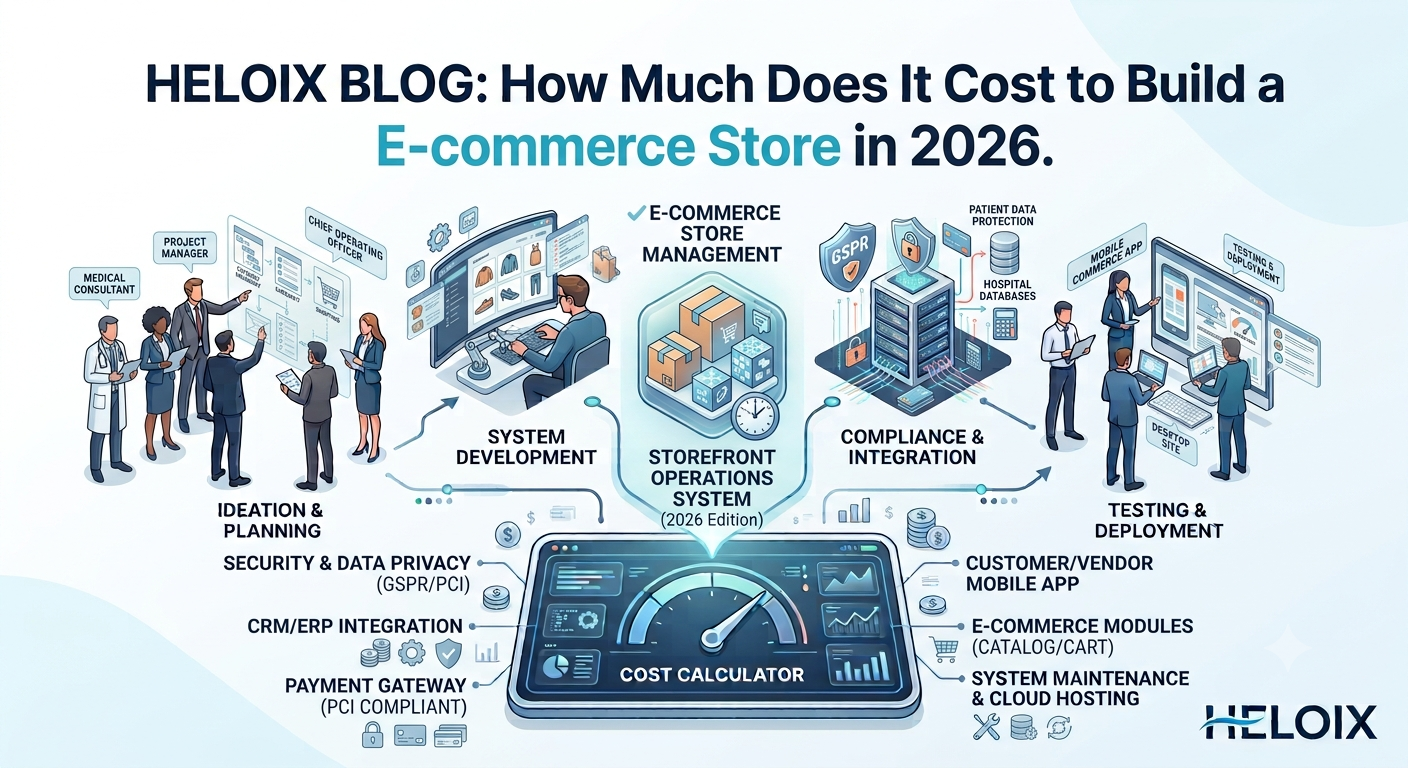
The global e-commerce retail market continues to grow rapidly. Direct-to-Consumer (D2C) brands, local retailers, and digital marketplaces are shifting toward high-performing digital storefronts powered by progressive web apps (PWAs), automated inventory syncing, AI product recommendation engines, multi-currency checkout, and integrated social shopping channels.
Whether you choose a monthly SaaS subscription (like Shopify or WooCommerce), invest in custom development, or utilize a ready-to-launch white-label solution, understanding the full financial breakdown helps you plan effectively. Below is a detailed cost analysis, operating expense guide, and a step-by-step launch framework.
The cost of an e-commerce store depends primarily on catalog size, mobile app requirements (iOS/Android), custom UI/UX design, and third-party integrations (ERP, POS, warehouse management, payment gateways).
  ┌──────────────────────────────────────────────────────────┐
  │ 1. Basic SaaS / Template Store: $300 – $1,500            │
  │    (₹15,000 – ₹60,000 in India)                          │
  └─────────────────────────────┬────────────────────────────┘
                                │
                                ▼
  ┌──────────────────────────────────────────────────────────┐
  │ 2. Custom D2C Web & Mobile App: $4,000 – $15,000         │
  │    (₹1,500,000 – ₹10,00,000 in India)                    │
  └─────────────────────────────┬────────────────────────────┘
                                │
                                ▼
  ┌──────────────────────────────────────────────────────────┐
  │ 3. Enterprise Multi-Vendor Marketplace: $18,000 – $50,000+│
  │    (₹12,00,000 – ₹40,00,000+ in India)                   │
  └─────────────────────────────┴────────────────────────────┘
| E-commerce Store Type | Included Features & Capabilities | Global Cost (USD) | Cost in India (INR) |
| Basic SaaS / Template Store | Standard template storefront, payment gateway integration, up to 100 SKUs, basic inventory tracking, responsive mobile web. | $300 – $1,500 | ₹15,000 – ₹60,000 |
| Custom D2C Web & Mobile App | Custom UI/UX, progressive web app (PWA) + iOS/Android apps, automated shipping calculator, loyalty points, abandoned cart recovery, CRM sync. | $4,000 – $15,000 | ₹1,500,000 – ₹10,00,000 |
| Enterprise Multi-Vendor Marketplace | Multi-tenant seller dashboards, commission split gateways, automated logistics dispatch, AI search recommendations, custom ERP/WMS integration. | $18,000 – $50,000+ | ₹12,00,000 – ₹40,00,000+ |
Custom UI/UX Design vs. Pre-made Themes: Building a unique, conversion-optimized design from scratch requires dedicated UX designers and front-end developers, increasing initial development hours compared to buying standard pre-made themes.
Native Mobile Apps (iOS & Android): Expanding beyond a web portal to include native mobile shopping applications increases build, testing, and app store deployment expenses.
Third-Party Integrations: Connecting automated inventory systems (ERP), Point of Sale (POS) retail hardware, accounting software (Tally, QuickBooks, Zoho), and warehouse systems adds custom API setup costs.
Multi-Currency & International Taxes: Offering localized payment processing, automated VAT/GST calculations, and multi-language dynamic routing for global shoppers.
Launching your digital store is only the baseline; long-term budget planning must account for recurring operational fees:
Cloud Hosting & Domain: High-performance cloud server hosting (AWS, Vercel, DigitalOcean) and SSL certificates ($20 to $200+/month).
Payment Gateway Merchant Fees: Transaction processing fees (typically 1.5% to 3% per transaction) charged by gateways like Stripe, Razorpay, or PayPal.
Shipping & Logistics APIs: Automated shipping aggregators and Cash-on-Delivery (COD) risk management integrations.
Maintenance & Security Updates: Regular security patches, plugin/dependency updates, and database optimization typically require 10% to 15% of the initial build budget annually.
Building a custom e-commerce web and mobile application ecosystem from scratch takes 4 to 8 months of custom software development.
By using ready-to-launch white-label e-commerce software, founders and business owners can achieve a 3-day launch timeline:
Day 1 — Branding & Domain Setup: Upload custom brand logos, choose your primary color theme, map custom SSL domains, and set up store admin credentials.
Day 2 — Catalog Upload & Payment Setup: Import product lists (CSV/Excel) with high-resolution imagery, set up pricing brackets, and connect automated payment gateways.
Day 3 — App Store Submission & Go-Live: Connect logistics tracking partners, submit mobile application packages to the Apple App Store and Google Play Store, and publish the web storefront live to public customers.
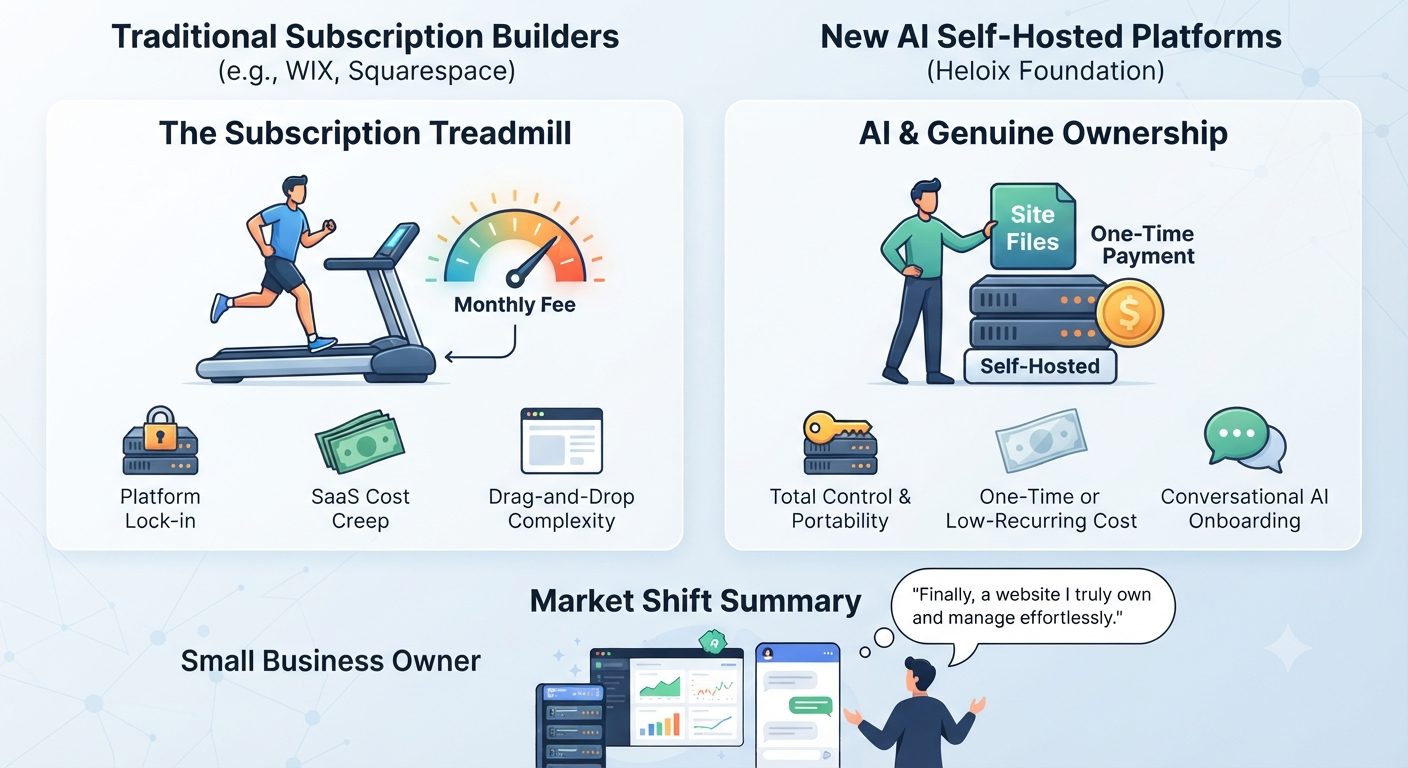
Solutions like those available through platforms like Heloix (such as Shopping Spark or Stockstr) offer pre-built software packages complete with web, Android, and iOS applications. By opting for full source code ownership, you avoid perpetual software licensing lock-in and gain complete freedom to host, customize, and scale your technology as your store grows.
  ┌──────────────────────────────────────────────────────────┐
  │ 1. Define Niche, Catalog & Sourcing Model                │
  └─────────────────────────────┬────────────────────────────┘
                                │
                                ▼
  ┌──────────────────────────────────────────────────────────┐
  │ 2. Deploy Turnkey White-Label Software Infrastructure    │
  └─────────────────────────────┬────────────────────────────┘
                                │
                                ▼
  ┌──────────────────────────────────────────────────────────┐
  │ 3. Populate Product Catalog & Tax Rules                   │
  └─────────────────────────────┬────────────────────────────┘
                                │
                                ▼
  ┌──────────────────────────────────────────────────────────┐
  │ 4. Integrate Payment Gateways & Logistics Carriers       │
  └─────────────────────────────┬────────────────────────────┘
                                │
                                ▼
  ┌──────────────────────────────────────────────────────────┐
  │ 5. Execute Targeted Customer Marketing Campaigns         │
  └─────────────────────────────┬────────────────────────────┘
                                │
                                ▼
  ┌──────────────────────────────────────────────────────────┐
  │ 6. Optimize Conversion Rates & Expand Multi-Channel Sales│
  └─────────────────────────────┴────────────────────────────┘
Identify your business model (e.g., Direct-to-Consumer brand, multi-vendor marketplace, wholesale B2B distribution, or curated reselling). Establish reliable inventory suppliers, packaging parameters, and delivery workflows.
Acquire a production-ready white-label software suite. Configure custom brand themes, upload store logos, set up admin permissions, and verify security encryption certificates.
Upload your product catalog:
Group items into clean navigation categories and subcategories.
Add detailed product descriptions, multi-angle photos, video clips, size charts, and SKU inventory counts.
Set up automated sales tax (GST/VAT) rules and local currency displays.
Set up financial and shipping operations:
Connect automated payment processing gateways (Stripe, Razorpay, PayPal, Apple Pay, Google Pay) supporting instant credit card and digital wallet checkouts.
Integrate local shipping partners to calculate real-time delivery costs, generate shipping labels, and send automated tracking links to buyers via WhatsApp and SMS.
Attract buyers to your digital storefront:
Search Engine Optimization (SEO): Build keyword-optimized product pages and buying guides targeting high-intent purchase searches.
Performance Advertising: Run targeted Meta (Instagram/Facebook) and Google Shopping video ad campaigns featuring direct store checkout links.
Influencer & Content Marketing: Partner with niche social creators for product unboxing videos and discount code promotions.
Track core e-commerce metrics including Average Order Value (AOV), Customer Acquisition Cost (CAC), cart abandonment rates, and customer repeat purchase ratios. Implement automated email/WhatsApp recovery sequences for abandoned carts and introduce loyalty programs to drive repeat orders.
Please to post a comment
No comments yet
Be the first to share your thoughts.
@heloix_news
Tech
@heloix_news
Tech
@heloix_news
Tech
Subscribe for the latest on technology, business growth and digital transformation.