
DiscussBuddy – تطبيق مراسلة في الوقت الحقيقي، مؤتمرات صوتية ومرئية (Node.js، React، WebRTC، Socket.IO)

ما تتضمنه الحزمة
بناء منصة تواصل من الصفر يستغرق من 12 إلى 18 شهرًا.
أو يمكنك إطلاق واحدة هذا الأسبوع.
المراسلة الفورية صعبة. مؤتمرات الفيديو أصعب. توسيع كلاهما معًا دون فقدان الإطارات أو الرسائل أو الانهيار تحت الحمل؟ هنا حيث تحرق معظم فرق التطوير الأشهر والميزانيات - فقط لتنتهي بشيء هش ونصف مكتمل.
DiscussBuddy تمنحك تطبيق ويب جاهز للإنتاج وعملي بالكامل للمراسلة الفورية، والمكالمات الصوتية ومؤتمرات الفيديو المبني على Node.js و React و WebRTC و Socket.IO - مع بنية تم حلها بالفعل، وواجهة مستخدم مصقولة بالفعل، وبنية تحتية تم اختبارها في المعارك بالفعل.
تجاوز الـ 18 شهرًا. أطلق منصتك للتواصل الآن.
لماذا يعتبر بناء التواصل الفوري من الصفر فخًا
| التحدي | بناء من الصفر | DiscussBuddy |
|---|---|---|
| المراسلة الفورية | أشهر من هندسة Socket | Socket.IO - مبني، مختبر، موسع |
| مؤتمرات الفيديو | تعقيد WebRTC + TURN/STUN | WebRTC + Mediasoup - جاهز للإنتاج |
| المكالمات الجماعية | تنهار P2P عند 3+ مشاركين | بنية SFU عبر mediasoup - تتوسع بشكل نظيف |
| واجهة المستخدم/تجربة المستخدم | تصميم + بناء من الصفر | واجهة مستخدم حديثة لـ React — فقاعات الدردشة، تخطيطات الفيديو، متجاوبة |
| وقت الوصول إلى السوق | 12–18 شهرًا كحد أدنى | نشر وتخصيص في أيام |
| تكلفة التطوير | $50K–$200K+ هندسة | شراء لمرة واحدة، الشيفرة المصدرية كاملة |
DiscussBuddy يوفر لك أصعب جزء في أي منتج تواصل — تم بناؤه بالفعل، يعمل بالفعل، جاهز للتخصيص.
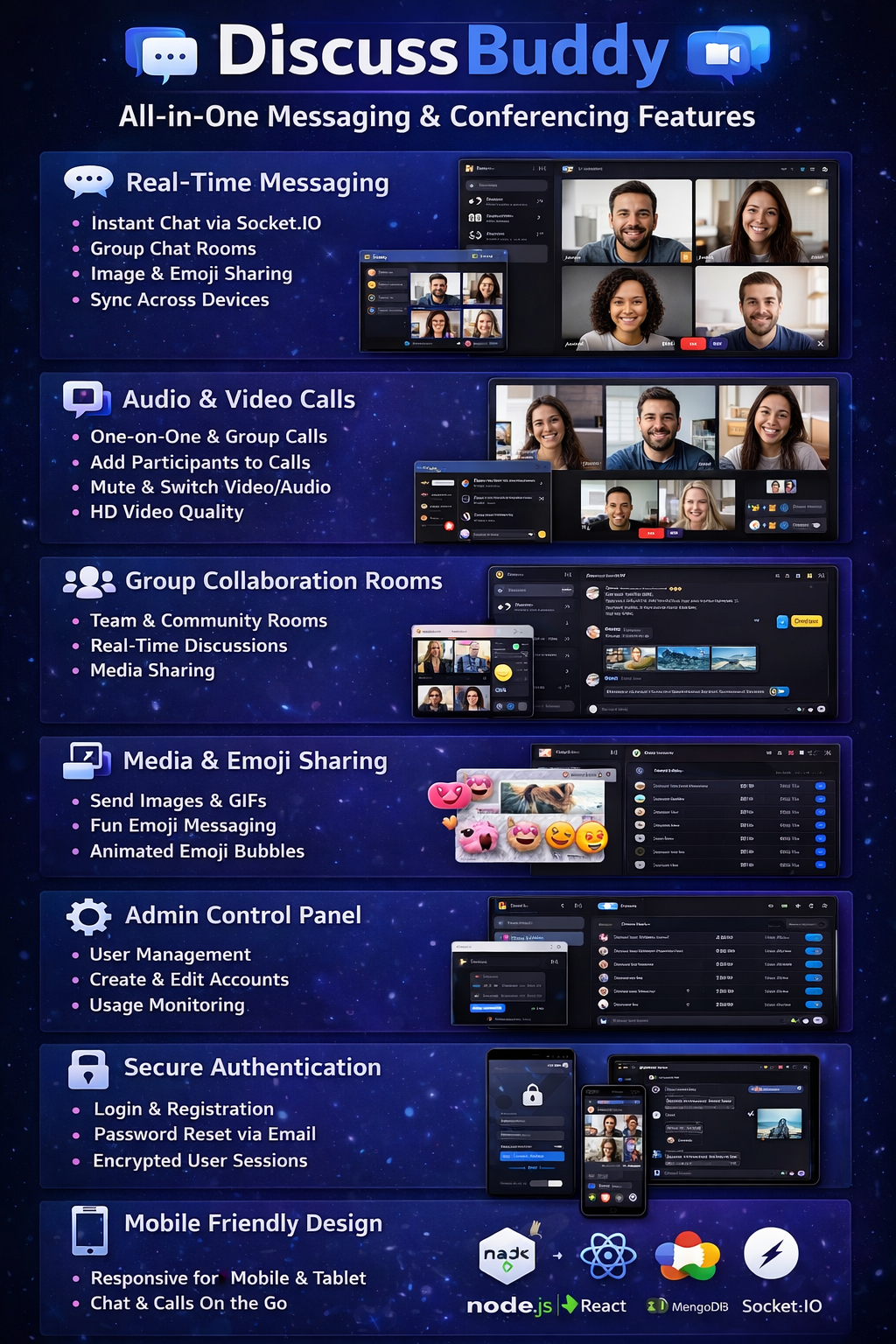
نظام رسائل فورية — فوري، موثوق، مصمم للتوسع
كل رسالة تُسلم على الفور. كل محادثة متزامنة عبر الأجهزة. لا تأخير، لا رسائل مفقودة، حتى تحت حمل متزامن ثقيل — مدعوم من تقنية الاتصال في الوقت الحقيقي Socket.IO.
- دردشة فورية في الوقت الحقيقي — تظهر الرسائل في اللحظة التي يتم إرسالها، دون استعلام، دون تحديث
- غرف محادثة جماعية — إنشاء غرف مخصصة للفرق، المشاريع، أو المجتمعات
- مشاركة الصور مع تحميل متعدد للصور — إرسال صورة واحدة أو عدة صور مباشرة في المحادثات
- دعم الرموز التعبيرية مع تنسيق رسائل مخصص للرموز التعبيرية فقط — الرسائل التي تحتوي على رموز تعبيرية فقط تظهر كفقاعات تعبيرية كبيرة، تمامًا مثل تطبيقات الدردشة الشهيرة
- تزامن الرسائل عبر الأجهزة — ابدأ محادثة على سطح المكتب، واستمر في الهاتف المحمول بسلاسة
- واجهة محادثة سلسة مع فقاعات دردشة حديثة — واجهة نظيفة ومصقولة يتعرف عليها المستخدمون على الفور
اتصال منخفض الكمون وأداء قابل للتوسع لآلاف المستخدمين المتزامنين. البنية التحتية مثبتة بالفعل — فقط قم بالنشر.
مؤتمرات صوتية ومرئية عالية الجودة — واضحة كالكريستال، متعددة المشاركين، قوية جداً
هنا هو المكان الذي يميز فيه DiscussBuddy نفسه حقًا.WebRTC مع mediasoup — وحدة توجيه انتقائية (SFU) تقوم بتوجيه تدفقات الوسائط بكفاءة بدلاً من فرض اتصالات نظير إلى نظير تتعطل عند النطاق الكبير.
- مكالمات صوتية ومرئية من واحد إلى واحد — محادثات خاصة وعالية الجودة مع حد أدنى من التأخير
- مكالمات جماعية متعددة المشاركين — مؤتمرات جماعية مستقرة لا تتدهور مع زيادة عدد المشاركين
- بث من واحد إلى العديد — مكالمات على نمط الويبينار حيث يقدم شخص واحد للعديد من المشاهدين
- التبديل السلس بين الصوت والفيديو — تبديل الكاميرا تشغيل/إيقاف دون قطع الاتصال
- إضافة المشاركين إلى مكالمة جارية — دعوة أشخاص جدد دون إعادة بدء المؤتمر
- كتم الميكروفون أو تعطيل الكاميرا في أي وقت — عناصر التحكم القياسية في المؤتمرات، متاحة دائمًا
- تخطيط فيديو تفاعلي مع وضع العرض تغطية/احتواء — تتكيف إطارات الفيديو بذكاء مع انضمام أو مغادرة المشاركين
تقوم Mediasoup بإدارة توجيه الوسائط بكفاءة، مما يوفر استقرارًا فائقًا مقارنةً بتنفيذات WebRTC التقليدية. هذه تقنية مؤتمرات من الدرجة المؤسسية — ليست عرضًا تجريبيًا لـ WebRTC.
غرف التعاون الجماعي — حيث تنجز الفرق العمل فعليًا
سواء كانت وقفة يومية لفريق عن بُعد، أو مناقشة في فصل دراسي، أو دردشة مجتمعية — فإن DiscussBuddy’sغرف المحادثة الجماعيةتجمع الناس معًا في الوقت الحقيقي.
- المراسلة متعددة المستخدمين — يرى الجميع في الغرفة كل رسالة على الفور
- مكالمات صوتية/مرئية جماعية — الانتقال من النص إلى المحادثة وجهًا لوجه بنقرة واحدة
- انضمام المشاركين في الوقت الحقيقي — الأعضاء الجدد ينضمون إلى المحادثات المباشرة دون انقطاع
- مناقشات تعاونية — محادثات متسلسلة تحافظ على السياق
- مشاركة الوسائط داخل الغرف — مشاركة الصور والملفات مباشرة في سياق المجموعة
مثالي لـالفرق البعيدة، التواصل الداخلي للشركات الناشئة، المجتمعات عبر الإنترنت، ومنصات التعليم — في أي مكان يحتاج فيه الناس إلى التعاون في الوقت الحقيقي.
مشاركة الوسائط & رسائل الرموز التعبيرية — تواصل غني ومعبر
النص وحده لم يعد كافيًا. المستخدمون العصريون يتوقعون رسائل غنية تشعر بأنها طبيعية ومعبرة.
- مشاركة الصور (واحدة أو متعددة) — تحميل وإرسال الصور مباشرة في أي محادثة
- رسائل الرموز التعبيرية — لوحة مفاتيح رموز تعبيرية كاملة مدمجة بشكل طبيعي في تدفق الدردشة
- تنسيق رسائل نظيف — الرسائل تظهر مع تباعد وتنسيق ووضوح مناسب
- رسوم متحركة سلسة لواجهة الدردشة — انتقالات دقيقة تجعل الواجهة تبدو حيوية واستجابة
- معاينة الصور داخل المحادثات — صور مصغرة مدمجة تتوسع عند النقر
الرسائل التي تحتوي على رموز تعبيرية فقط تظهر تلقائيًا كفقاعات تعبيرية كبيرة — النوع من اللمسات النهائية التي تجعل المستخدمين يشعرون وكأنهم يستخدمون تطبيق رسائل عالمي المستوى.
إدارة المستخدمين & لوحة الإدارة — تحكم كامل في منصتك
كل منصة تواصل تحتاج إلى إشراف وإدارة. DiscussBuddy يتضمن أداة قوية لوحة تحكم المديرمصممة لمشغلي المنصة.
- إنشاء مستخدمين— تسجيل أعضاء جدد برمجياً أو من خلال واجهة الإدارة
- تحرير ملفات تعريف المستخدمين— تحديث المعلومات والأذونات والإعدادات
- حذف أو إدارة الحسابات— التعامل مع إلغاء التنشيط والحظر وتنظيف الحسابات
- مراقبة استخدام المنصة— رؤية للمستخدمين النشطين ونشاط المنصة
- التحكم في الوصول إلى الرسائل— إدارة من يمكنه مراسلة من والوصول إلى أي غرف
سواء كنت تدير نشرًا مؤسسيًا أو منتج SaaS أو منصة مجتمعية — فإن أدوات الإدارة جاهزة بالفعل.
المصادقة والأمان — آمنة بشكل افتراضي
تتعامل منصات الاتصال مع المحادثات الحساسة. تأخذ DiscussBuddy الأمان على محمل الجد من خلال نظام مصادقة كامل.
- نظام تسجيل الدخول والتسجيل— تدفق تسجيل نظيف للمستخدمين الجدد
- تشفير كلمة المرور الآمن— تشفير قياسي صناعي لجميع بيانات الاعتماد المخزنة
- إعادة تعيين كلمة المرور عبر البريد الإلكتروني— استعادة الحساب بشكل ذاتي دون تدخل الإدارة
- دعم صورة الملف الشخصي— رموز تعبيرية مخصصة للمستخدمين عبر المنصة
- طرق محمية وجلسات مستخدمين— الوصول غير المصرح به محظور عند كل نقطة نهاية
بيئة تواصل آمنة للمستخدمين والمنظمات — بنية تحتية للمصادقة لا تحتاج لبنائها.
متجاوب بالكامل — سطح المكتب، التابلت، والهواتف المحمولة
لن يكون مستخدموك دائمًا على مكاتبهم. يعمل DiscussBuddy بشكل مثالي على كل أحجام الشاشات.
- متصفحات سطح المكتب — تجربة كاملة الميزات مع لوحات جانبية، شبكات الفيديو، وقوائم المحادثات
- الأجهزة اللوحية — واجهة لمسية محسّنة لغرف الاجتماعات والتعاون أثناء التنقل
- متصفحات الهواتف المحمولة — رسائل ومكالمات كاملة من أي هاتف ذكي
- واجهة رسائل متجاوبة — التصميمات تتكيف بشكل نظيف دون فقدان الوظائف
الدردشة، مشاركة الوسائط، والانضمام إلى مكالمات الفيديو مباشرة من أي جهاز — لا حاجة لتطبيق موبايل منفصل.
تقنية البنية التحتية — حديثة، قابلة للتوسع، وصديقة للمطورين
الواجهة الخلفية
- Node.js — مدفوعة بالأحداث، غير حاصرة للمدخلات/المخرجات مثالية للتطبيقات في الوقت الحقيقي
- Express.js — إطار عمل ويب سريع وبسيط لبنية API نظيفة
- MongoDB — قاعدة بيانات مرنة تعتمد على الوثائق وقابلة للتوسع أفقيًا
الواجهة الأمامية
- React.js — واجهة مستخدم قائمة على المكونات لواجهات سريعة وتفاعلية
- Redux — إدارة حالة متوقعة لحالة التطبيق المعقدة
الرسائل الفورية & الوسائط
- Socket.IO — رسائل موثوقة ثنائية الاتجاه في الوقت الحقيقي
- WebRTC — معيار بث الوسائط من نظير إلى نظير
- Mediasoup — وحدة توجيه اختيارية (SFU) للمؤتمرات متعددة الأطراف القابلة للتوسع
تضمن هذه الحزمة الكاملة من MERN مع SFU Mediasoup أداءً عاليًا وقابلية للتوسع وموثوقية في الوقت الحقيقي — نفس التقنيات المستخدمة في المنصات التي تتعامل مع ملايين الاتصالات المتزامنة.
بناء أي منتج للتواصل
| أدوات تعاون الفريق | منصات التواصل SaaS | تطبيقات الاستشارات الصحية عن بُعد |
| أنظمة الفصول الدراسية عبر الإنترنت | منصات الدردشة المجتمعية | أدوات دعم العملاء للدردشة |
مثالي لـ
| شركات SaaS الناشئة إطلاق منصات الرسائل |
المطورون بناء أدوات التعاون |
الشركات أنظمة الاتصال الداخلي |
| مزودو الرعاية الصحية عن بُعد استشارات الطبيب مع المريض |
منصات التعليم الإلكتروني فصول دراسية عبر الإنترنت & دروس خصوصية |
منصات اجتماعية تطبيقات المجتمع والشبكات |
النتيجة النهائية
تعتبر الرسائل الفورية ومؤتمرات الفيديو من أصعب العناصر في أي منصة تواصل لبنائها من الصفر.DiscussBuddyتقدم لك كلاهما — جاهز للاستخدام، تم اختباره في الإنتاج، ومبني على بنية قابلة للتوسع — حتى تتمكن من التركيز على ما يجعل منتجك فريدًا بدلاً من إعادة اختراع WebRTC.
عملية شراء واحدة. الكود المصدري الكامل. أطلق منصتك للتواصل في أسابيع بدلاً من سنوات.
محتويات المنتج
تطبيق ويب
تطبيق ويب متجاوب
تطبيق Android
تطبيق Android أصيل (Native)
تطبيق iOS
تطبيق iOS أصيل (Native)
منصة SaaS
بنية SaaS متعددة المستأجرين
تكامل الذكاء الاصطناعي
ميزات متقدمة في الذكاء الاصطناعي وتعلّم الآلة
الكود المصدري الكامل
ملكية كاملة للكود المصدري
حزمة التقنيات
تقنيات تطبيقات الجوال
تقييمات العملاء
بناءً على 35 تقييم
Saved Our Startup 6 Months of Development
We were quoted 4-6 months and $80K to build a messaging platform from scratch. Bought DiscussBuddy, customized it for our niche in 3 weeks, and launched. Real-time messaging works perfectly, video calls are stable, and the mediasoup SFU architecture handles our growing user base without any issues.
Mediasoup SFU Makes All the Difference
Tried building video conferencing with basic WebRTC peer-to-peer before. It broke at 3 participants. DiscussBuddy uses mediasoup as an SFU which handles multi-party calls properly. We regularly have 8-10 people on group calls with stable video and audio. This is the correct architecture for production.
Redux State Management Keeps the App Predictable
As a React developer, I appreciate the Redux implementation. State management for a real-time app is notoriously difficult — messages streaming in, call states changing, participants joining. DiscussBuddy handles all of it cleanly through Redux. Made debugging and extending the app much easier.
شارك تجربتك
ساعد الآخرين بمشاركة تجربتك مع هذا المنتج
اختر باقتك
جارٍ تحميل خيارات الباقة...
DiscussBuddy – تطبيق مراسلة في الوقت الحقيقي، مؤتمرات صوتية ومرئية (Node.js، React، WebRTC، Socket.IO)
شراء لمرة واحدة • الكود المصدري الكامل متضمن
عن هذا المنتج
بناء منصة تواصل من الصفر يستغرق من 12 إلى 18 شهرًا.
أو يمكنك إطلاق واحدة هذا الأسبوع.
المراسلة الفورية صعبة. مؤتمرات الفيديو أصعب. توسيع كلاهما معًا دون فقدان الإطارات أو الرسائل أو الانهيار تحت الحمل؟ هنا حيث تحرق معظم فرق التطوير الأشهر والميزانيات - فقط لتنتهي بشيء هش ونصف مكتمل.
DiscussBuddy تمنحك تطبيق ويب جاهز للإنتاج وعملي بالكامل للمراسلة الفورية، والمكالمات الصوتية ومؤتمرات الفيديو المبني على Node.js و React و WebRTC و Socket.IO - مع بنية تم حلها بالفعل، وواجهة مستخدم مصقولة بالفعل، وبنية تحتية تم اختبارها في المعارك بالفعل.
تجاوز الـ 18 شهرًا. أطلق منصتك للتواصل الآن.
لماذا يعتبر بناء التواصل الفوري من الصفر فخًا
| التحدي | بناء من الصفر | DiscussBuddy |
|---|---|---|
| المراسلة الفورية | أشهر من هندسة Socket | Socket.IO - مبني، مختبر، موسع |
| مؤتمرات الفيديو | تعقيد WebRTC + TURN/STUN | WebRTC + Mediasoup - جاهز للإنتاج |
| المكالمات الجماعية | تنهار P2P عند 3+ مشاركين | بنية SFU عبر mediasoup - تتوسع بشكل نظيف |
| واجهة المستخدم/تجربة المستخدم | تصميم + بناء من الصفر | واجهة مستخدم حديثة لـ React — فقاعات الدردشة، تخطيطات الفيديو، متجاوبة |
| وقت الوصول إلى السوق | 12–18 شهرًا كحد أدنى | نشر وتخصيص في أيام |
| تكلفة التطوير | $50K–$200K+ هندسة | شراء لمرة واحدة، الشيفرة المصدرية كاملة |
DiscussBuddy يوفر لك أصعب جزء في أي منتج تواصل — تم بناؤه بالفعل، يعمل بالفعل، جاهز للتخصيص.
نظام رسائل فورية — فوري، موثوق، مصمم للتوسع
كل رسالة تُسلم على الفور. كل محادثة متزامنة عبر الأجهزة. لا تأخير، لا رسائل مفقودة، حتى تحت حمل متزامن ثقيل — مدعوم من تقنية الاتصال في الوقت الحقيقي Socket.IO.
- دردشة فورية في الوقت الحقيقي — تظهر الرسائل في اللحظة التي يتم إرسالها، دون استعلام، دون تحديث
- غرف محادثة جماعية — إنشاء غرف مخصصة للفرق، المشاريع، أو المجتمعات
- مشاركة الصور مع تحميل متعدد للصور — إرسال صورة واحدة أو عدة صور مباشرة في المحادثات
- دعم الرموز التعبيرية مع تنسيق رسائل مخصص للرموز التعبيرية فقط — الرسائل التي تحتوي على رموز تعبيرية فقط تظهر كفقاعات تعبيرية كبيرة، تمامًا مثل تطبيقات الدردشة الشهيرة
- تزامن الرسائل عبر الأجهزة — ابدأ محادثة على سطح المكتب، واستمر في الهاتف المحمول بسلاسة
- واجهة محادثة سلسة مع فقاعات دردشة حديثة — واجهة نظيفة ومصقولة يتعرف عليها المستخدمون على الفور
اتصال منخفض الكمون وأداء قابل للتوسع لآلاف المستخدمين المتزامنين. البنية التحتية مثبتة بالفعل — فقط قم بالنشر.
مؤتمرات صوتية ومرئية عالية الجودة — واضحة كالكريستال، متعددة المشاركين، قوية جداً
هنا هو المكان الذي يميز فيه DiscussBuddy نفسه حقًا.WebRTC مع mediasoup — وحدة توجيه انتقائية (SFU) تقوم بتوجيه تدفقات الوسائط بكفاءة بدلاً من فرض اتصالات نظير إلى نظير تتعطل عند النطاق الكبير.
- مكالمات صوتية ومرئية من واحد إلى واحد — محادثات خاصة وعالية الجودة مع حد أدنى من التأخير
- مكالمات جماعية متعددة المشاركين — مؤتمرات جماعية مستقرة لا تتدهور مع زيادة عدد المشاركين
- بث من واحد إلى العديد — مكالمات على نمط الويبينار حيث يقدم شخص واحد للعديد من المشاهدين
- التبديل السلس بين الصوت والفيديو — تبديل الكاميرا تشغيل/إيقاف دون قطع الاتصال
- إضافة المشاركين إلى مكالمة جارية — دعوة أشخاص جدد دون إعادة بدء المؤتمر
- كتم الميكروفون أو تعطيل الكاميرا في أي وقت — عناصر التحكم القياسية في المؤتمرات، متاحة دائمًا
- تخطيط فيديو تفاعلي مع وضع العرض تغطية/احتواء — تتكيف إطارات الفيديو بذكاء مع انضمام أو مغادرة المشاركين
تقوم Mediasoup بإدارة توجيه الوسائط بكفاءة، مما يوفر استقرارًا فائقًا مقارنةً بتنفيذات WebRTC التقليدية. هذه تقنية مؤتمرات من الدرجة المؤسسية — ليست عرضًا تجريبيًا لـ WebRTC.
غرف التعاون الجماعي — حيث تنجز الفرق العمل فعليًا
سواء كانت وقفة يومية لفريق عن بُعد، أو مناقشة في فصل دراسي، أو دردشة مجتمعية — فإن DiscussBuddy’sغرف المحادثة الجماعيةتجمع الناس معًا في الوقت الحقيقي.
- المراسلة متعددة المستخدمين — يرى الجميع في الغرفة كل رسالة على الفور
- مكالمات صوتية/مرئية جماعية — الانتقال من النص إلى المحادثة وجهًا لوجه بنقرة واحدة
- انضمام المشاركين في الوقت الحقيقي — الأعضاء الجدد ينضمون إلى المحادثات المباشرة دون انقطاع
- مناقشات تعاونية — محادثات متسلسلة تحافظ على السياق
- مشاركة الوسائط داخل الغرف — مشاركة الصور والملفات مباشرة في سياق المجموعة
مثالي لـالفرق البعيدة، التواصل الداخلي للشركات الناشئة، المجتمعات عبر الإنترنت، ومنصات التعليم — في أي مكان يحتاج فيه الناس إلى التعاون في الوقت الحقيقي.
مشاركة الوسائط & رسائل الرموز التعبيرية — تواصل غني ومعبر
النص وحده لم يعد كافيًا. المستخدمون العصريون يتوقعون رسائل غنية تشعر بأنها طبيعية ومعبرة.
- مشاركة الصور (واحدة أو متعددة) — تحميل وإرسال الصور مباشرة في أي محادثة
- رسائل الرموز التعبيرية — لوحة مفاتيح رموز تعبيرية كاملة مدمجة بشكل طبيعي في تدفق الدردشة
- تنسيق رسائل نظيف — الرسائل تظهر مع تباعد وتنسيق ووضوح مناسب
- رسوم متحركة سلسة لواجهة الدردشة — انتقالات دقيقة تجعل الواجهة تبدو حيوية واستجابة
- معاينة الصور داخل المحادثات — صور مصغرة مدمجة تتوسع عند النقر
الرسائل التي تحتوي على رموز تعبيرية فقط تظهر تلقائيًا كفقاعات تعبيرية كبيرة — النوع من اللمسات النهائية التي تجعل المستخدمين يشعرون وكأنهم يستخدمون تطبيق رسائل عالمي المستوى.
إدارة المستخدمين & لوحة الإدارة — تحكم كامل في منصتك
كل منصة تواصل تحتاج إلى إشراف وإدارة. DiscussBuddy يتضمن أداة قوية لوحة تحكم المديرمصممة لمشغلي المنصة.
- إنشاء مستخدمين— تسجيل أعضاء جدد برمجياً أو من خلال واجهة الإدارة
- تحرير ملفات تعريف المستخدمين— تحديث المعلومات والأذونات والإعدادات
- حذف أو إدارة الحسابات— التعامل مع إلغاء التنشيط والحظر وتنظيف الحسابات
- مراقبة استخدام المنصة— رؤية للمستخدمين النشطين ونشاط المنصة
- التحكم في الوصول إلى الرسائل— إدارة من يمكنه مراسلة من والوصول إلى أي غرف
سواء كنت تدير نشرًا مؤسسيًا أو منتج SaaS أو منصة مجتمعية — فإن أدوات الإدارة جاهزة بالفعل.
المصادقة والأمان — آمنة بشكل افتراضي
تتعامل منصات الاتصال مع المحادثات الحساسة. تأخذ DiscussBuddy الأمان على محمل الجد من خلال نظام مصادقة كامل.
- نظام تسجيل الدخول والتسجيل— تدفق تسجيل نظيف للمستخدمين الجدد
- تشفير كلمة المرور الآمن— تشفير قياسي صناعي لجميع بيانات الاعتماد المخزنة
- إعادة تعيين كلمة المرور عبر البريد الإلكتروني— استعادة الحساب بشكل ذاتي دون تدخل الإدارة
- دعم صورة الملف الشخصي— رموز تعبيرية مخصصة للمستخدمين عبر المنصة
- طرق محمية وجلسات مستخدمين— الوصول غير المصرح به محظور عند كل نقطة نهاية
بيئة تواصل آمنة للمستخدمين والمنظمات — بنية تحتية للمصادقة لا تحتاج لبنائها.
متجاوب بالكامل — سطح المكتب، التابلت، والهواتف المحمولة
لن يكون مستخدموك دائمًا على مكاتبهم. يعمل DiscussBuddy بشكل مثالي على كل أحجام الشاشات.
- متصفحات سطح المكتب — تجربة كاملة الميزات مع لوحات جانبية، شبكات الفيديو، وقوائم المحادثات
- الأجهزة اللوحية — واجهة لمسية محسّنة لغرف الاجتماعات والتعاون أثناء التنقل
- متصفحات الهواتف المحمولة — رسائل ومكالمات كاملة من أي هاتف ذكي
- واجهة رسائل متجاوبة — التصميمات تتكيف بشكل نظيف دون فقدان الوظائف
الدردشة، مشاركة الوسائط، والانضمام إلى مكالمات الفيديو مباشرة من أي جهاز — لا حاجة لتطبيق موبايل منفصل.
تقنية البنية التحتية — حديثة، قابلة للتوسع، وصديقة للمطورين
الواجهة الخلفية
- Node.js — مدفوعة بالأحداث، غير حاصرة للمدخلات/المخرجات مثالية للتطبيقات في الوقت الحقيقي
- Express.js — إطار عمل ويب سريع وبسيط لبنية API نظيفة
- MongoDB — قاعدة بيانات مرنة تعتمد على الوثائق وقابلة للتوسع أفقيًا
الواجهة الأمامية
- React.js — واجهة مستخدم قائمة على المكونات لواجهات سريعة وتفاعلية
- Redux — إدارة حالة متوقعة لحالة التطبيق المعقدة
الرسائل الفورية & الوسائط
- Socket.IO — رسائل موثوقة ثنائية الاتجاه في الوقت الحقيقي
- WebRTC — معيار بث الوسائط من نظير إلى نظير
- Mediasoup — وحدة توجيه اختيارية (SFU) للمؤتمرات متعددة الأطراف القابلة للتوسع
تضمن هذه الحزمة الكاملة من MERN مع SFU Mediasoup أداءً عاليًا وقابلية للتوسع وموثوقية في الوقت الحقيقي — نفس التقنيات المستخدمة في المنصات التي تتعامل مع ملايين الاتصالات المتزامنة.
بناء أي منتج للتواصل
| أدوات تعاون الفريق | منصات التواصل SaaS | تطبيقات الاستشارات الصحية عن بُعد |
| أنظمة الفصول الدراسية عبر الإنترنت | منصات الدردشة المجتمعية | أدوات دعم العملاء للدردشة |
مثالي لـ
| شركات SaaS الناشئة إطلاق منصات الرسائل |
المطورون بناء أدوات التعاون |
الشركات أنظمة الاتصال الداخلي |
| مزودو الرعاية الصحية عن بُعد استشارات الطبيب مع المريض |
منصات التعليم الإلكتروني فصول دراسية عبر الإنترنت & دروس خصوصية |
منصات اجتماعية تطبيقات المجتمع والشبكات |
النتيجة النهائية
تعتبر الرسائل الفورية ومؤتمرات الفيديو من أصعب العناصر في أي منصة تواصل لبنائها من الصفر.DiscussBuddyتقدم لك كلاهما — جاهز للاستخدام، تم اختباره في الإنتاج، ومبني على بنية قابلة للتوسع — حتى تتمكن من التركيز على ما يجعل منتجك فريدًا بدلاً من إعادة اختراع WebRTC.
عملية شراء واحدة. الكود المصدري الكامل. أطلق منصتك للتواصل في أسابيع بدلاً من سنوات.
أبرز المزايا
ملكية كاملة للكود المصدري
وصول كامل إلى جميع الملفات المصدرية دون أي قيود
جاهز للإطلاق
مُعد مسبقاً، ومُختبر، وجاهز للنشر الفوري
قابل للتخصيص بالكامل
عدّل وطوّر وخصص بما يناسب احتياجاتك